GPU vs. CPU Bottleneck: How to Tell Which One Is Actually Killing Your FPS
August 9, 2026
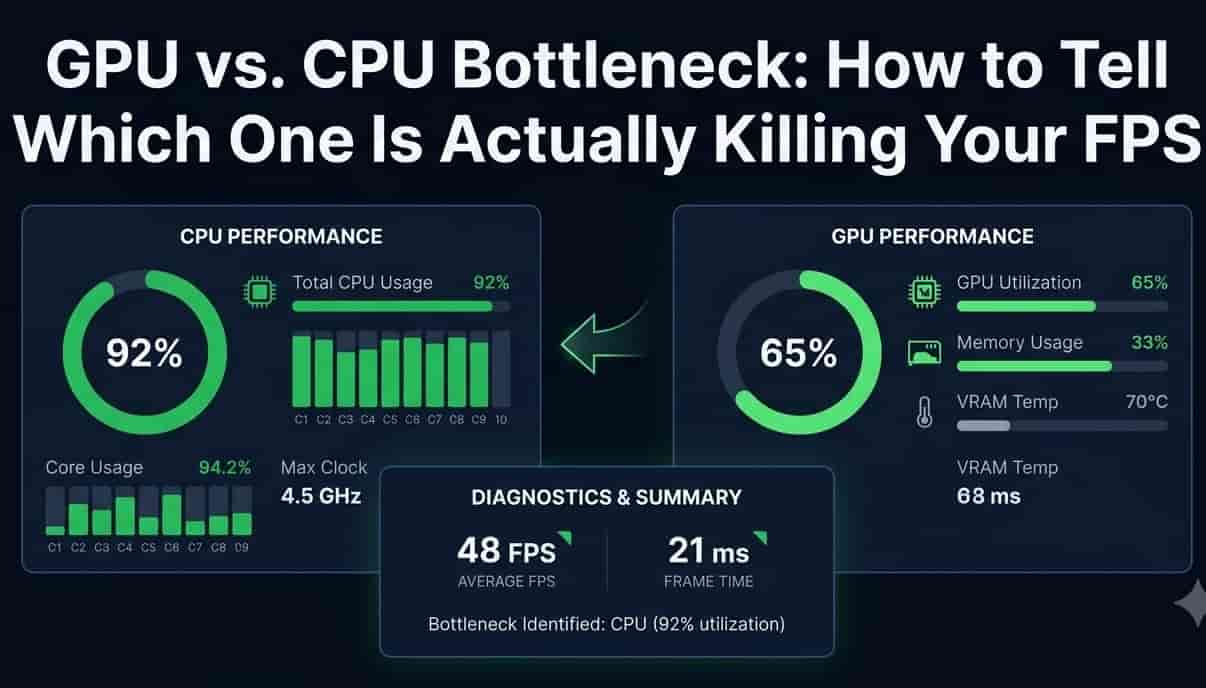
Your FPS is low, so obviously it's your graphics card, right? Not always, actually. A lot of people upgrade their GPU, spend real money, and their FPS barely moves. Turns out the graphics card wasn't the problem at all. The CPU was.
Let's figure out how to actually tell which one's holding you back, without guessing.
What a PC Performance Bottleneck Actually Means
Simple way to think about it: your GPU and CPU are a team, and a team only moves as fast as its slowest member. Whichever one's working the hardest while the other one waits around, that's your bottleneck.
GPU bottleneck - your graphics card is maxed out, CPU has room to spare
CPU bottleneck - your processor is maxed out, GPU is sitting there waiting for work
Neither one is "bad hardware." It just means one part is holding the other back.
Signs You've Got a GPU Bottleneck
Pretty easy to spot once you know what to look for:
GPU usage sits near 100% most of the time
CPU usage is noticeably lower, sometimes way lower
Turning down graphics settings (resolution, shadows, textures) actually raises your FPS
This is the more common one, honestly, especially if you're gaming at higher resolutions like 1440p or 4K
Signs You've Got a CPU Bottleneck
This one's sneakier because it feels the same in the moment, low FPS, but the cause is different.
CPU usage is high, sometimes pegged at 100% on one or two cores specifically
Lowering graphics settings barely helps, sometimes doesn't help at all
Happens a lot in CPU-heavy games, strategy games, simulation games, anything with lots of AI or physics calculations
Low FPS With High CPU Usage
If you're seeing low FPS and your CPU usage graph is sitting near the top, that's about as clear a sign as you'll get. Your processor simply can't feed the game data fast enough, so the GPU ends up waiting around with nothing to render. Turning down graphics settings won't help much here, since graphics settings mostly affect the GPU, not the CPU.
GPU Usage Percentage Low? Here's Why
Here's the one that confuses people. Your GPU usage sits at like 60-70% even in a demanding-looking game, and it feels wrong, shouldn't a powerful card be maxed out? Not if the CPU can't keep up. A low GPU usage percentage while your FPS is bad almost always points back to the CPU, it just means your graphics card is finishing its work early and waiting on the next batch of instructions.
Low FPS With Low GPU Usage Too? Something Else Might Be Going On
Every once in a while, neither number looks maxed out. GPU usage is low, CPU usage is low, and FPS is still bad. That's not really a bottleneck at all, that's usually something else entirely, like:
Background apps quietly eating resources
Power saving mode throttling your laptop
An outdated driver limiting performance before it even gets to the GPU or CPU
A game capping its own frame rate internally
Worth ruling these out before assuming it's a hardware bottleneck problem.
How to Check for a Bottleneck, Step by Step
You don't need fancy software for the basics, Windows already has what you need.
Open Task Manager (Ctrl + Shift + Esc)
Click the Performance tab
Launch the game you're having trouble with, alt-tab back and forth, or glance at a second monitor if you've got one
Watch both the CPU and GPU usage graphs while you play
If you want more detail than Task Manager gives you:
MSI Afterburner - free, shows GPU usage, temps, and clock speeds as an in-game overlay
HWiNFO - more advanced, tracks basically everything, good if you want the full picture
Is My CPU Bottlenecking My GPU? A Simple Gaming Bottleneck Test
Want a quick answer instead of watching graphs for twenty minutes? Try this:
Load into a game and note your FPS at your normal settings
Drop the resolution way down, say to 720p, keeping everything else the same
If your FPS jumps a lot, your GPU was the limit, lowering its workload freed it up
If your FPS barely moves at all, your CPU is the bottleneck, since resolution changes mostly affect GPU load, not CPU load
That one test alone answers "is my CPU bottlenecking my GPU" better than staring at usage percentages most of the time.

Fixing a GPU Bottleneck
Lower resolution or turn down demanding settings like shadows, ray tracing, and anti-aliasing
Use upscaling if the game supports it, DLSS, FSR, that kind of thing
Honestly, sometimes the answer really is a GPU upgrade, this is the one case where that actually helps
Fixing a CPU Bottleneck
Close background apps, seriously, browsers and Discord eat more CPU than people realize
Lower CPU-heavy settings specifically, things like draw distance, NPC count, or physics detail, not just graphics quality
Make sure your RAM is running at its rated speed, not the slow default some motherboards ship with
Update your motherboard's BIOS occasionally, sounds unrelated, but it can actually improve CPU performance in games
Quick Sanity Check With Your Frame Rate
Not sure where to even start? Run our FPS Test and try the Stress Test Lab, it dials up GPU load specifically so you can watch how your FPS reacts. If your numbers drop hard under graphical load, that's leaning GPU. If they barely move no matter what you throw at it, the bottleneck's probably sitting somewhere else, likely your CPU.
FAQ
Is a bottleneck always a bad thing? Not really, some bottleneck is basically unavoidable, one part is always working slightly harder than the other. It only becomes a real problem when the gap is big enough to actually waste performance you paid for.
Can upgrading my GPU make things worse? Not worse exactly, but if you're already CPU bottlenecked, a stronger GPU just sits there waiting more often. You won't see the FPS gain you were expecting.
Does more RAM fix a CPU bottleneck? Sometimes, indirectly. It's less about the amount and more about speed, faster RAM can meaningfully help CPU performance in games, more RAM alone usually doesn't.