How Much FPS Do You Actually Lose From Screen Recording While Gaming?
September 4, 2026
Introduction
If you've ever started recording a game and immediately opened your FPS counter, you're definitely not alone.
A lot of gamers worry that recording gameplay will destroy performance. Some people even avoid recording altogether because they think they'll lose a huge amount of FPS. The reality is a little different.
Yes, screen recording can reduce FPS. That's simply because your PC is doing extra work. But in most cases, the performance drop is much smaller than people expect.
I've seen players panic over losing 5 FPS while recording. Meanwhile, others were losing 20–30 FPS and didn't realize their recording settings were the real problem.
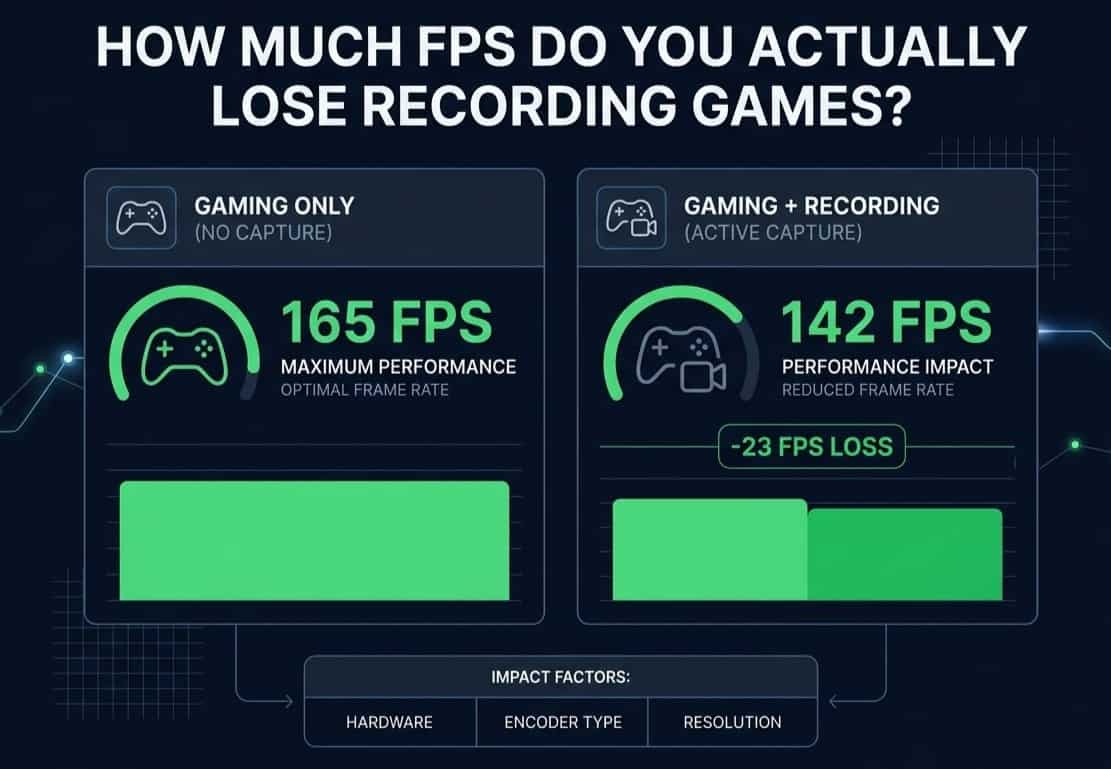
So how much FPS do you actually lose? The answer depends on your hardware, recording software, game settings, and recording quality.
Let's break it down in simple terms.
1. Does Screen Recording Really Reduce FPS?
Short answer: yes.
When you're gaming, your PC is already busy.
Your graphics card is rendering frames. Your CPU is handling game logic, physics, and background tasks. Your RAM is storing game data.
The moment you start recording, your system has another job:
Capture the gameplay
Encode the video
Save the file to storage
That extra workload can reduce performance.
The important thing to understand is that recording doesn't affect every PC equally.
A powerful gaming rig may barely notice the recording process.
An older system might struggle.
2. How Much FPS Do Most Gamers Lose?
For modern gaming PCs, the numbers are usually pretty reasonable.
Typical FPS Loss
Recording Method
Average FPS Loss
NVIDIA ShadowPlay
0%–5%
OBS with NVENC
1%–5%
OBS with AMD Encoder
1%–7%
OBS CPU Encoding
5%–20%
Older Hardware
10%–30%
Let's say you're getting 120 FPS in a game.
With hardware encoding enabled, you might drop to:
118 FPS
115 FPS
112 FPS
Most players won't even notice that difference.
However, if you're already running a demanding game at 45–50 FPS, losing another 10 FPS can feel much more significant.
That's why results vary so much from one player to another.
3. Why Some Gamers Lose More FPS Than Others
This is where things get interesting.
Two players can use the exact same recording software and get completely different results.
Why? Because several factors affect performance.
Your Graphics Card
Modern GPUs are much better at recording than older ones.
For example:
RTX 3060
RTX 4060
RTX 4070
RX 7700 XT
RX 7800 XT
These cards include dedicated video encoders. They can record gameplay with minimal performance loss. Older cards often have to work harder.
As a result, FPS drops become more noticeable.
Your Processor
Many gamers focus only on the GPU.
The CPU matters too.
If your processor is already close to 100% usage while gaming, recording can push it over the edge.
That's when you start seeing:
FPS drops
Stuttering
Frame pacing issues
Input delay
Sometimes the GPU gets blamed when the CPU is actually the bottleneck.
The Game You're Playing
Not every game affects recording performance equally. Some games are relatively easy to run.
Examples include:
Valorant
League of Legends
Rocket League
Dota 2
Others can push hardware extremely hard.
Examples include:
Cyberpunk 2077
Starfield
Black Myth: Wukong
Microsoft Flight Simulator
The heavier the game, the less room your system has left for recording.
4. Hardware Encoding vs Software Encoding
If there's one thing that affects recording performance more than almost anything else, it's the encoder.
What Is Hardware Encoding?
Hardware encoding uses a dedicated encoder built into your graphics card.
Examples include:
NVIDIA NVENC
AMD AMF
Intel Quick Sync
Because the encoder is separate from game rendering, performance loss stays low.
For most gamers, this is the best option.
What Is Software Encoding?
Software encoding uses the CPU instead.
Now your processor has to:
Run the game
Encode the video
That's a lot more work.
The result is often:
Higher CPU usage
Lower FPS
More stuttering
Unless you have a specific reason to use software encoding, hardware encoding is usually the smarter choice.
5. Does OBS Reduce FPS?
OBS gets blamed for a lot of performance problems.
Sometimes unfairly.
OBS itself isn't usually the issue.
The settings are.
I've seen people record:
4K
120 FPS
High bitrate
Multiple overlays
Then wonder why performance dropped. That's like loading a truck with bricks and being surprised it's slower. OBS can run extremely efficiently when configured properly.
OBS Settings That Matter Most
Resolution
Higher resolutions require more resources.
Examples:
720p = low impact
1080p = moderate impact
1440p = higher impact
4K = highest impact
Recording FPS
Recording at:
30 FPS uses fewer resources
60 FPS uses more resources
120 FPS can become demanding
For most YouTube creators, 1080p 60 FPS is the sweet spot.
Bitrate
Higher bitrates create larger files and increase workload. Using an unnecessarily high bitrate often wastes storage without providing noticeable quality improvements.
6. What About NVIDIA ShadowPlay?
ShadowPlay is one of the most efficient recording solutions available. That's because it uses NVIDIA's dedicated NVENC encoder.
For many gamers, the FPS difference is tiny. Sometimes only 1–3 FPS.
In fact, plenty of players record entire gaming sessions without ever noticing a performance change. That's impressive compared to older recording methods.
7. Signs Recording Is Hurting Performance
FPS isn't the only thing you should watch. Sometimes the FPS counter looks fine, but the game feels worse.
Watch for these signs:
Micro-Stuttering
The game feels uneven even when FPS appears high.
Input Delay
Mouse movement feels slower than usual.
Frame Spikes
Sudden FPS drops during intense scenes.
Audio Problems
Recorded audio becomes out of sync.
High CPU Usage
CPU constantly sits near 95–100%.
These issues often indicate recording settings are too aggressive.
8. How to Reduce FPS Loss While Recording
The good news is that you can usually improve performance without buying new hardware.
1. Use Hardware Encoding
This is the biggest improvement most gamers can make.
Switching from CPU encoding to NVENC alone can dramatically reduce FPS loss.
2. Lower Recording Resolution
Ask yourself:
Do you really need 4K recording?
For many creators, 1080p looks fantastic and performs much better.
3. Close Background Apps
Before recording:
Close browsers
Close launchers
Close unnecessary software
Every bit of free performance helps.
4. Record to an SSD
Modern SSDs handle large video files much better than older hard drives.
This can help reduce stuttering during long recording sessions.
5. Lower Demanding Graphics Settings
Try reducing:
Ray tracing
Shadows
Volumetric effects
Reflections
You may gain extra headroom for recording.
6. Update Drivers
Graphics driver updates often improve recording stability and encoder performance. It's a simple fix that many gamers forget.
9. Is Streaming More Demanding Than Recording?
Usually, yes.
Recording only saves video to your computer.
Streaming must:
Capture gameplay
Encode video
Upload data continuously
That's additional work. This is why streamers often experience larger performance drops compared to people who only record.
10. Should You Worry About FPS Loss?
Honestly, probably not. If you're using a modern gaming PC and hardware encoding, recording is much less demanding than it used to be.
Most gamers lose only a small amount of FPS. In many cases, the difference is so small that you'd never notice it without an FPS counter running in the corner.
The bigger concern is usually poor recording settings rather than recording itself.
Frequently Asked Questions
Does recording gameplay lower FPS?
Yes. Recording uses system resources, so some FPS loss is normal.
How much FPS does OBS reduce?
Typically between 1% and 10%, depending on settings and hardware.
Is ShadowPlay better than OBS?
ShadowPlay usually has a smaller performance impact, while OBS offers more customization.
Does recording affect input lag?
It can if your system becomes overloaded.
Can low RAM cause recording stutter?
Yes. Insufficient RAM can create performance issues during gaming and recording.
Is 1080p 60 FPS the best recording setting?
For most gamers, yes. It offers a good balance of quality and performance.
Does recording to an SSD help?
It can improve recording stability and reduce storage-related bottlenecks.
Conclusion
So, how much FPS do you actually lose from screen recording while gaming?
For most modern systems using hardware encoding, the answer is surprisingly little. Many gamers lose only a few frames per second, often somewhere between 0% and 5%.
The biggest factors are your hardware, recording settings, game requirements, and encoder choice.
If you want the best results, stick with hardware encoding, avoid unnecessarily high recording settings, and keep your system free from background clutter. Do that, and you'll be able to record gameplay smoothly without sacrificing much performance at all.
For most players, recording gameplay today is far easier than it was a few years ago. In fact, you might be surprised by how little FPS you actually lose.