Backlight Bleed Test

Free black screen test for LCD monitors, laptops and TVs. Find backlight bleed, tell it apart from IPS glow, check for clouding, and get a uniformity score you can use for a warranty claim.

Tip: dim the lights first. In fullscreen use ← → or Space to switch, G to hide controls, Esc or click to exit.

Bleed Zone Logger & Uniformity Score

After the black test, click each zone to set how much light you saw there. Center bleed counts more because it's most visible in games and films.

100
Uniformity score / 100

Excellent - no real bleed. Keep this monitor.

Quick Guide

1

Dim the Lights

Turn off room lights and set monitor brightness to the level you normally use. Bleed is only visible in the dark.

2

Run the Black Test

Open Pure Black in fullscreen and look at the corners and edges. Bright cloudy patches are backlight bleed; a glow that moves with your head is IPS glow.

3

Log Your Zones

Use the Bleed Zone Logger above to mark what you saw in each of the 9 zones and get a uniformity score for your warranty claim.

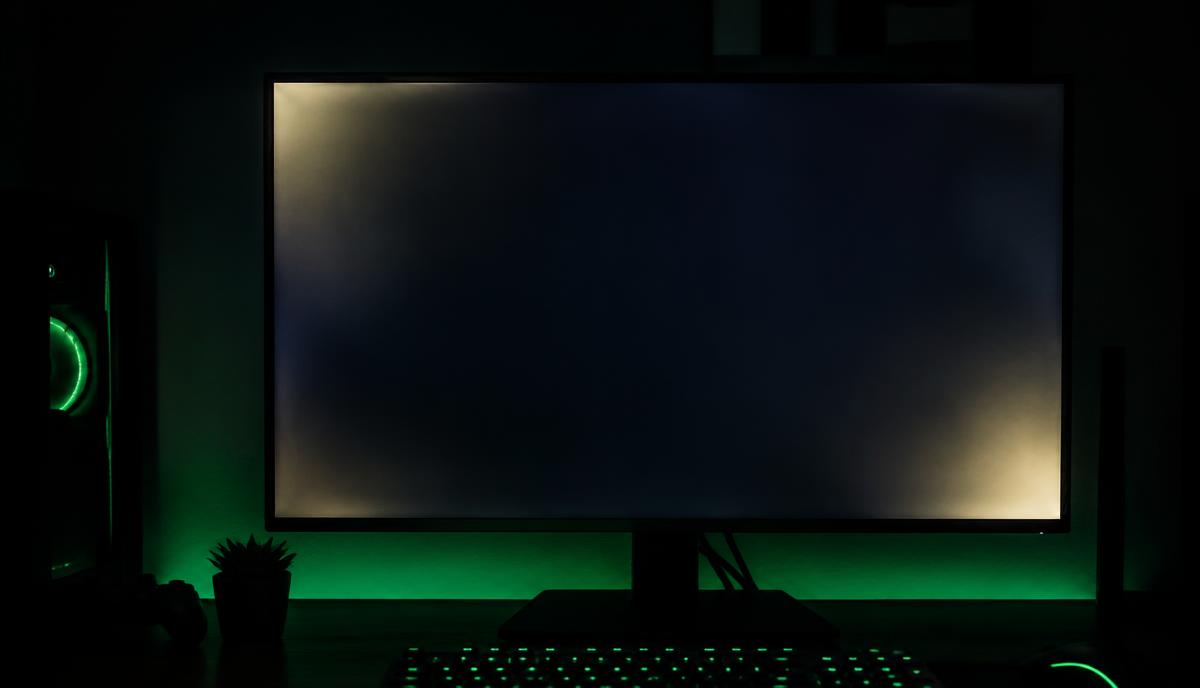
Gaming monitor in a dark room showing a black screen with visible backlight bleed glowing from the corners and edges of the LCD panel
Backlight bleed appears as bright cloudy patches around the corners and edges of a black screen in a dark room.

How to Test Your Monitor for Backlight Bleed

  1. 1.Prepare the room: Turn off or dim the room lights and close curtains so no outside light hits the screen.
  2. 2.Set normal brightness: Use the brightness you normally game or watch at. Very high brightness exaggerates bleed.
  3. 3.Let the monitor warm up: Leave the monitor on for 10 to 15 minutes so the backlight reaches stable output.
  4. 4.Open the Pure Black test: Click Pure Black to fill the screen. Sit at your normal distance, about an arm's length away.
  5. 5.Check edges and corners: Look for bright patches along each edge and corner. Move your head to see if they shift (IPS glow) or stay fixed (bleed).
  6. 6.Try the near-black grays: Use 1% to 15% gray to find clouding and uneven patches that appear in real dark game scenes.
  7. 7.Log the zones: Mark each zone in the Bleed Zone Logger to get a uniformity score you can save for a warranty claim.

Backlight Bleed vs IPS Glow vs Clouding

CheckBacklight bleedIPS glowClouding
WhereEdges and cornersCorners, mostly when closePatches anywhere
Moves with your head?No, stays fixedYes, changes with angleNo
ColorYellow / white / blueSilver-white or amberGrayish blotches
Panel typesIPS, VA, TN, Mini-LEDIPS onlyVA and IPS, edge-lit
Is it a defect?Only if strongNo, normal for IPSOnly if visible in content

Quick check: lean back and move your head left and right. If the bright corners fade or change shape, it's IPS glow. If they stay put, it's bleed.

How to Photograph Backlight Bleed for a Warranty Claim

  • Shoot straight on from your normal sitting distance, not from the side.
  • Use Pro / manual mode: ISO 100-400 and a shutter of about 1/15s, so the photo matches what your eyes see.
  • On auto mode, tap the screen and drag exposure down until the black looks like real life.
  • Take one photo of the Pure Black test and one of a real dark movie or game scene.
  • Include your uniformity score from the logger above in the support ticket.

When Should You Return the Monitor?

Keep it

Faint edge glow seen only on pure black in a dark room.

Watch it

Visible corners at night, but not in normal games or films. Retest in a week.

Return it

Bleed shows in black bars, dark game scenes or at medium brightness.

Most retailers allow returns within 14-30 days, which is usually easier than a warranty claim. Brands like Dell, ASUS, LG, Samsung and BenQ treat bleed case by case, so clear photos and a description of real-world impact help most.

How to Reduce Backlight Bleed

  • Lower brightness - bleed shrinks as backlight output drops.
  • Add soft bias lighting behind the monitor so your eyes see less contrast.
  • Slightly loosen the back screws to relieve pressure on the panel (may affect warranty).
  • Gently rub the bezel near the bleed with a microfiber cloth - never press the screen itself.
  • Consider OLED or Mini-LED with full array local dimming if deep blacks matter to you.

Also check for faulty pixels with our Dead Pixel Test and set up colors with the Monitor Color Calibration tool.

Frequently Asked Questions

What is backlight bleed?

Backlight bleed is light from an LCD monitor's backlight leaking around the edges or corners of the panel. It shows up as bright patches, usually yellowish or bluish, on a dark or black screen. It happens when the panel, frame and diffuser layers don't sit perfectly flat against each other.

How do I test my monitor for backlight bleed?

Dim the room lights, set brightness to your normal level, open the Pure Black fullscreen test above and look at the screen straight on from about one arm's length. Bright patches along the edges or corners that stay in the same place when you move your head are backlight bleed.

What is the difference between IPS glow and backlight bleed?

IPS glow changes when you move your head or change viewing angle and is strongest in the corners when you sit close. Backlight bleed stays fixed in the same spot no matter where you look from. IPS glow is normal for IPS panels; heavy backlight bleed is a defect.

How much backlight bleed is normal?

A small amount of faint edge bleed visible only on a pure black screen in a dark room is considered normal by almost every manufacturer. Bleed that is visible in normal content, such as movies with black bars or dark game scenes at regular brightness, is usually grounds for a return or warranty claim.

Can backlight bleed be fixed?

Sometimes. Slightly loosening the screws on the back of the monitor or gently massaging the bezel near the bleed with a soft cloth can reduce pressure on the panel. Do this carefully, as it may void your warranty. For new monitors, returning or exchanging is the safest option.

Does backlight bleed get worse over time?

Bleed can improve a little over the first few weeks as the panel settles, but it can also get worse if the frame warps due to heat. Mild bleed usually stays stable. Test again after a week of use before deciding to return.

Do OLED screens have backlight bleed?

No. OLED screens have no backlight because every pixel produces its own light, so they cannot have backlight bleed or IPS glow. Black on OLED is truly black. This test is meant for LCD screens: IPS, VA, TN and Mini-LED.

Why does my phone photo show much worse bleed than I see?

Phone cameras automatically raise exposure on dark scenes, which makes bleed look far stronger than it is. For a fair photo, lock the exposure, lower ISO, and take the picture from your normal sitting distance and angle.

Explore More Tools

Get the full picture of your setup. Each tool is free, runs in your browser, and needs zero downloads.